Short answer: use AI that runs where the documents already are. That means a model running on the company’s own machines, either a single computer or a server on the office network, or an open model hosted in infrastructure the company controls. Enterprise plans of cloud AI reduce the risk, but the document still leaves the company. Redacting first helps for some documents and not for others.
Which one fits depends on three things: how many people need it, what is in the documents, and whether anyone in the company can run servers. The rest of this guide goes through each option, what it does with your data, and how to choose.
The options at a glance
| Option | Where the document goes | Suits | Watch out for |
|---|---|---|---|
| Consumer AI chat (free or personal plans) | The provider’s cloud, under consumer terms | Nothing confidential | Retention and training settings vary by plan and change over time. Staff often use it anyway. |
| Redact, then use cloud AI | The provider’s cloud, minus the parts you removed | Documents where the sensitive part is a few names or numbers | Context often identifies the client even after names are removed. Slow to do well by hand. |
| Enterprise cloud AI | The provider’s cloud, under a business contract | Sensitive work that is allowed to leave the company under contract | The document still leaves. Depends on the contract, data location and what your clients agreed to. |
| Self-hosted open models | Your own servers, or a private tenancy in a cloud you rent | Larger organisations with an IT or machine learning team | Hardware cost, setup and upkeep. A private cloud tenancy is still someone else’s building. |
| Local or on-premises AI | A computer at the desk, or a server on the office network | Small and mid-sized teams whose documents cannot leave | Smaller models than the largest cloud ones. Hardware has to be sized. Not every task is supported. |
First, check whether the document can leave at all
Before choosing a tool, settle whether this particular document is allowed to go to any outside service. The answer usually comes from three places: the client contract or engagement letter, the regulator that covers your sector, and your own data classification. In Singapore, for example, the PDPC and the Ministry of Law have both published guidance on using generative AI with personal and client data.
If the answer is yes, under conditions, enterprise cloud AI may be enough. If the answer is no, or nobody is sure, the document needs an option where it stays inside the company. Our Document Test sets out five questions for making that call document by document.
Option 1: Consumer AI chat
Free and personal plans are built for individuals, not for client data. What happens to what you paste in depends on the plan and the settings, and those terms change. For confidential client documents this is the option to rule out, which in practice means giving staff an approved alternative. Banning a tool without offering a replacement tends to push the same documents into the same tool, quietly.
Option 2: Redact, then use cloud AI
Removing names, account numbers and identifiers before uploading can work for documents where the sensitive part is small and easy to find. It works less well for contracts, financial statements and case files, where the surrounding detail is enough to identify the client. It also depends on someone doing the redaction carefully every time, which is the step most likely to be skipped on a busy day.
Option 3: Enterprise cloud AI
The business plans of the major AI assistants come with contractual commitments on data use, retention and security that consumer plans do not. For many workflows that is a reasonable answer. The question is not whether enterprise cloud AI is insecure. The question is whether every company workflow should have to leave the company’s environment in order to use AI.
If your client contracts, your regulator or your own policy say a document must not go to an outside processor, a better contract does not change that. The document still travels.
Option 4: Self-hosted open models
Open-weight models can be run on servers the company owns, or in a private tenancy with a cloud provider. This gives the most control and the widest choice of models. It also needs people: someone has to choose the hardware, deploy the model, keep it updated and secure it. For organisations with an IT or machine learning team, this is often the right answer.
One distinction matters here. A private tenancy in a rented cloud keeps your data separate from other customers, but it is still in someone else’s data centre. If the requirement is that documents stay on premises, that is not the same thing.
Option 5: AI that runs on your own machines
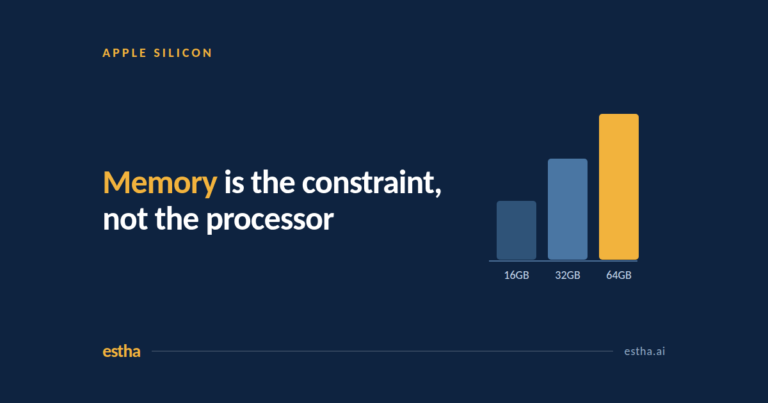
For smaller teams, the practical version of “keep it in the company” is AI that runs on a computer at the desk or on a server in the office. Current Apple silicon Macs share one pool of memory between the processor and the graphics chip, which lets them run capable open models that would otherwise need a dedicated graphics card. Memory is the main constraint, and our guide on how much RAM you need to run AI locally works through it for one person, a team and a shared office server.
This is the case Estha on Mac is built for. Estha on Mac runs AI on your own Mac, or on-premises when connected to an Estha Server on your office network. For supported workflows, documents do not need to go to cloud AI. Its Document Processing agent summarises, reviews, rewrites and translates Word and Markdown documents and exports the result to Word. A single Mac needs Apple silicon M2 or later with at least 16GB of unified memory, and 32GB is recommended. A shared Estha Server for a team is an enterprise setup that is sized and configured for the office.
How to choose
- Can the document leave the company at all? If not, only options 4 and 5 are left.
- How many people need it? One person or a small team can start on a single machine. A whole department needs a server, whether self-hosted or an office server.
- Who will run it? With an IT or machine learning team, self-hosting gives the most control. Without one, a packaged local or on-premises product is more realistic.
- What is the task? Summarising, reviewing and drafting from documents suit local models well. Tasks that need the very largest models, or live data from other systems, may not.
What local AI will not do
Local and on-premises AI is not a free upgrade on cloud AI. The models that fit on a desk or an office server are smaller than the largest cloud models, so some tasks will be slower or less polished. Hardware has to be sized for the number of people and the size of the model. And it covers the workflows a product supports, not everything a general chat assistant can attempt. For documents that cannot leave the company, those are usually acceptable trade-offs. For everything else, cloud AI may still be the better tool, and many companies will end up using both.
Frequently asked questions
Is enterprise cloud AI safe for confidential client documents?
It can be, if your client contracts and your regulator allow the document to be processed by an outside provider under contract. Read the data use, retention and location terms. If the requirement is that the document never leaves the company, enterprise cloud AI does not meet it, however good the contract.
Does redacting documents make cloud AI safe?
Sometimes. It works when the sensitive part is a few identifiers. It works poorly when the content itself identifies the client, as in most contracts and financial documents.
Is a private cloud the same as on-premises?
No. A private cloud tenancy separates your data from other customers, but the servers belong to the cloud provider. On-premises means the hardware is in your own office.
Can a small firm run AI on confidential documents without an IT team?
Yes, for supported workflows. A packaged product that runs on a desktop or laptop needs no server administration. Sharing one setup across a team needs an office server that is sized and configured for the team.
How much hardware do we need?
It depends on the model and the number of people. See our guide on how much RAM you need to run AI locally. For Estha on Mac, a single Mac needs M2 or later with 16GB of unified memory as a minimum and 32GB recommended.
Not sure which documents in your firm can leave? Start with the Document Test, or see how Estha on Mac works.
One email a month on private AI. For people who cannot put their work in the cloud. No spam, unsubscribe anytime.