Short answer: for one person, you do not need a server to run private AI. A single Mac with enough memory can run private AI on its own. For a team, usually yes: one capable machine on the office network runs the AI model, and everyone else’s computer connects to it. How big that server needs to be depends on the models you use and how many people use it at the same time, not on a fixed number of seats.
This guide covers when one machine is enough, why teams move to a shared server, what decides its size, and what the rest of the team’s computers need.
The setups at a glance
| Setup | Suits | What it needs | Trade-off |
|---|---|---|---|
| One person, one Mac | An individual professional | One Mac with enough unified memory for the model | Nothing is shared with colleagues |
| Each person on their own Mac | A few people working separately | Every Mac needs enough memory to run the model | Upgrading every laptop is expensive, and each person’s knowledge stays on their machine |
| A team sharing one server | A small team in one office | One capable server; staff computers can be lighter | The server has to be sized and set up for the team |
| A larger team | Departments or several teams | More than one server | Needs planning around how many people use it at once |
When one machine is enough
If one person uses private AI for their own work, a single Mac is all it takes. The model, the documents and the answers stay on that machine. The main question is memory, because the model has to fit in it. Our guide on how much RAM you need to run AI locally goes through the numbers.
Why teams usually move to a shared server
Once several people need it, running the model on every laptop gets expensive quickly. Every machine would need enough memory to hold the model, and most office laptops do not have it. A shared server to run private AI turns that around: one machine with plenty of memory does the AI work, and everyone else’s computer only sends requests to it and shows the answers.
A shared setup also means the team can work from the same company knowledge instead of each person keeping their own copy.
What decides how big the server needs to be
There is no fixed number of users per server. The size depends on three things:
- The models you run. Larger models give better answers on harder tasks but need more memory.
- How many people use it at the same time. Ten people who each use it a few times a day are a lighter load than ten people asking questions at once. When several people use it together, answers come back more slowly. In our own testing, two people sharing one server worked fine, with answers a little slower than for one person.
- Room to grow. A bigger team may need more than one server rather than one very large machine.
As a starting point for Estha on Mac, a server needs at least 32GB of unified memory, 48GB is a more comfortable floor in practice, and larger models call for 64GB or more. The right size for a particular team is something to work out from how that team actually uses it, not from a table.
What everyone else’s computer needs
Much less than the server. The staff computers do not run the model, so they can be ordinary machines. In our testing, MacBooks with 8GB of memory connected to the server without trouble.
Today, the computers that connect to an Estha Server are Macs. Support for Windows laptops is something we may add in the future, depending on demand.
Does the work leave the office?
That depends on the setup, so it is worth being precise:
- On a single Mac: your files, the AI model and the answers all stay on your Mac.
- With a server: day-to-day work stays on your own network. Staff computers send requests to your own server, not to the internet or a cloud AI.
- Internet: not needed for day-to-day use. It is only used to install, update and download models.
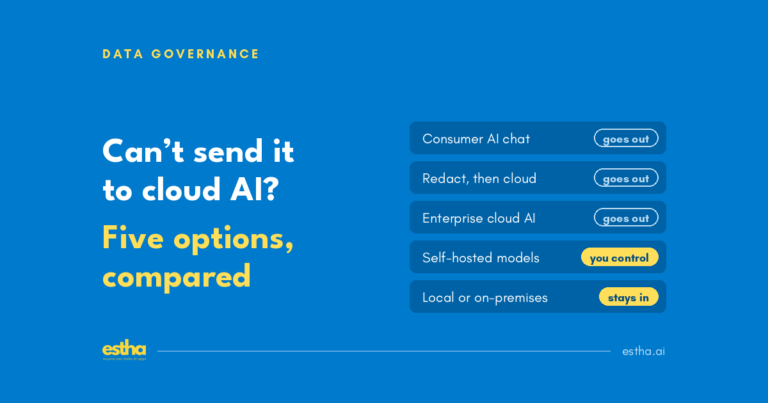
If you are still deciding which documents can go to cloud AI at all, start with what to use when confidential client documents cannot go to cloud AI.
Where Estha on Mac fits
Estha on Mac covers both setups. It runs AI on your own Mac, or on-premises when connected to an Estha Server on your office network. For supported workflows, documents do not need to go to cloud AI. A single Mac needs Apple silicon M2 or later with at least 16GB of unified memory, and 32GB is recommended. A shared Estha Server is set up for the team: sized to how many people will use it and which models they need.
Frequently asked questions
Can one Mac run private AI for a whole team?
A capable Mac can act as the server for a small team, with everyone else connecting to it. How many people it can serve depends on the models and how many use it at the same time, so it should be sized for the team rather than assumed.
How much memory does a server to run private AI need?
For Estha on Mac, at least 32GB, with 48GB a more comfortable floor and 64GB or more for larger models.
Do employees need powerful laptops?
No. The server does the AI work, so the Macs that connect to it can be ordinary machines. In our testing, 8GB MacBooks worked fine.
Does a shared AI server need internet access?
Not for day-to-day use. Internet is used to install the software, update it and download models.
What happens when several people use it at once?
It keeps working, but answers come back more slowly as more people use it at the same moment. That is why the server is sized to how the team uses it.
Planning private AI for your team? See how Estha on Mac works, or read how much RAM you need to run AI locally.
One email a month on private AI. For people who cannot put their work in the cloud. No spam, unsubscribe anytime.